Short answer
ChatGPT can help a small business with its words: quotes, review replies, job follow-ups and service pages. It drafts, you check. It can also search the web and cite its sources, so people may find your business that way. Keep customer details, card numbers and passwords out of it, on any plan.[1]
OpenAI's help pages on ChatGPT search and business data, and its crawler documentation, checked Nov 22, 2026.
What ChatGPT is good for in a local business
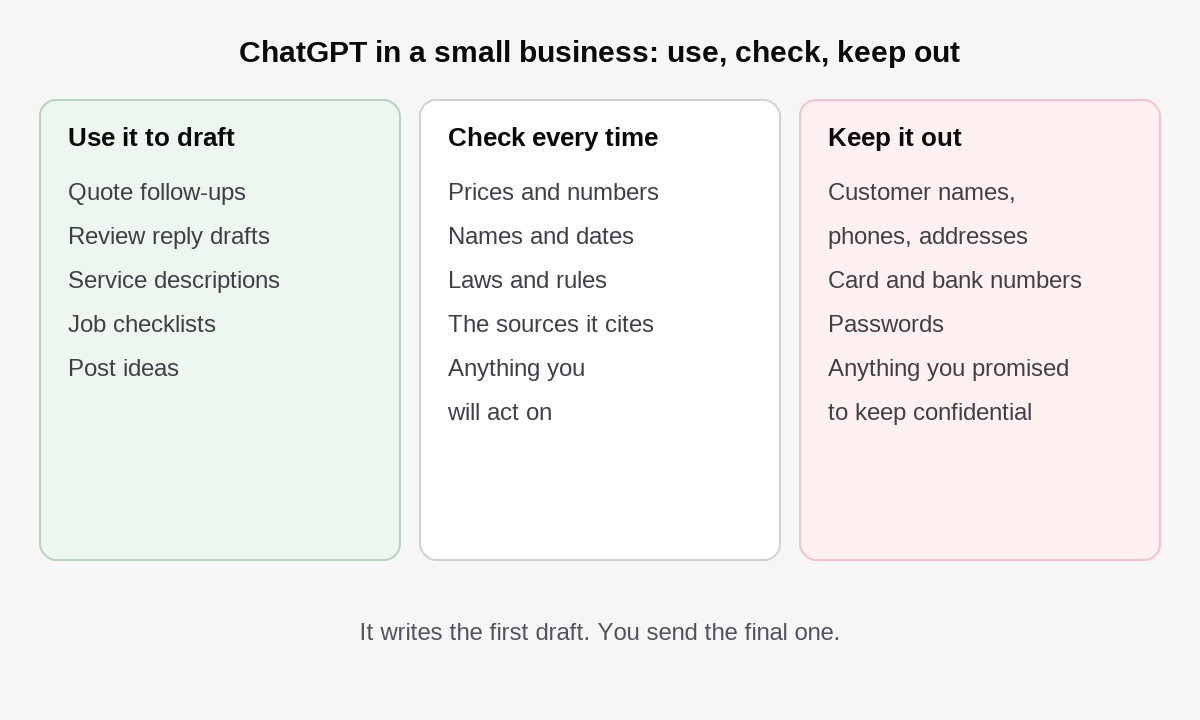
ChatGPT is good with words, not with running your calendar or your van. Treat it like a keen new hire: fast, and every line it writes needs your check.
It can also search the web to answer a question with current information, and link the sources it used.[1]
OpenAI says search results and citations can be incomplete, outdated or incorrect. Open a cited source before you act.[1]
- Drafting replies to Google reviews, good and bad.
- Writing follow-up notes to customers whose quotes went quiet.
- Outlining service pages you'd otherwise stare at.
- Turning one finished job into this week's Google post.
Worked example · made by Local Biz Legends
Worked example: five prompts for a service business
Five prompts to start with, written for trade and local service firms. Swap in your trade and town, and check every answer before it leaves your desk.
Follow up a quiet quote
Ask it: 'Write a short follow-up text to a customer who asked about a bathroom repaint two weeks ago and hasn't replied.' Check the price and dates before sending.
Draft a review reply
Ask it: 'Here is a Google review, with the name taken out. Write a calm reply as the owner: thank them, name the job, offer to fix any problem by phone.' Post it with the steps in our review reply guide.
Outline a service page
Ask it: 'Outline a service page for a local window-cleaning firm: an intro, what's included, five customer questions, a call to action.' Check prices and claims against what you do.
Build a job checklist
Ask it: 'Write a checklist for staining a deck: prep, safety, cleanup, a final walk-through.' Check it against how you actually work.
Find this week's post
Ask it: 'Give me one short post for a heating firm in a cold week. One homeowner tip, no emojis, under 80 words.' Check the tip fits your services.
What are 5 things I should never share with ChatGPT?
You can't know where a paste ends up. Treat every prompt like an email to a stranger. These five never go in, on any plan:
- Customer personal details: names, addresses, phone numbers, email addresses.
- Card and bank numbers, yours or a customer's.
- Passwords, PINs and logins for any account, including your Google Business Profile.
- Anything you agreed to keep confidential: supplier pricing, client lists, employee files.
- Health details, or anything a customer told you in confidence.
On a business plan such as ChatGPT Business, the default is on your side: OpenAI says it doesn't use inputs or outputs from products for business users to improve its models. Read your plan's terms all the same.[2]
How ChatGPT search finds businesses
When someone asks ChatGPT about a plumber or a bakery nearby, its answer may include citations, links the asker can open. That's how a business can show up behind an answer.[1]
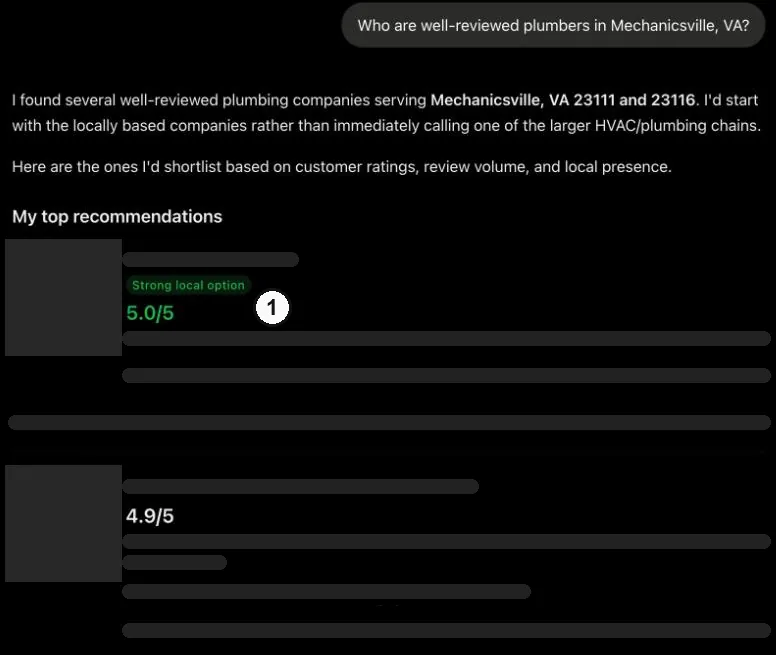
Local answers depend on where the asker seems to be. ChatGPT may use an approximate location from their IP address; device location sharing is off by default.[1]
Your site can only be shown in ChatGPT search answers if OpenAI's search crawler, OAI-SearchBot, is allowed to crawl it. Sites that opt out won't be shown in those answers, though they can still appear as navigational links.[3]
To make your site eligible, OpenAI recommends allowing OAI-SearchBot in your robots.txt file and its published IP ranges.[3]
Change robots.txt and give it a day: OpenAI notes about 24 hours for its search systems to adjust.[3]
Start with Google, though: if you're missing from Maps and local search, our guide to not showing on Google Maps covers the usual causes.
Can I use ChatGPT to start a business?
Yes, for the desk work. It can outline a simple plan, draft your services list, write the copy for a one-page website, and explain insurance terms in plain words.
What it can't do is vouch for a fact. OpenAI says search results and citations can be incomplete, outdated or incorrect, and to use an authoritative source when accuracy matters. Let it explain a licence; confirm with the issuing board.[1]
Getting found is a separate job. Before the doors open, list your business on Google so your name, services and area are on Search and Maps from day one.
And if you'd rather someone else handled your Google profile and posts while you run the jobs, that's what Get Found does for owners.
Related help for owners
Rather have it done for you?
Get found everywhere people search. We do the work.
Questions owners ask
Is ChatGPT free to use for my small business?
There's a free tier of ChatGPT, and OpenAI says web search is available on it, along with the paid plans. That's enough to try every prompt on this page before you spend anything on a plan. You can always move up later.[1]
Will ChatGPT recommend my business to local people?
It can, but nobody can promise it. ChatGPT search cites websites it finds, and OpenAI says placement is not guaranteed. Make your site eligible: allow OAI-SearchBot in your robots.txt file, and keep your website worth citing, with clear services and areas.[1][3]
How do I stop my website appearing in ChatGPT?
Add a rule to your robots.txt file that disallows OAI-SearchBot. OpenAI says sites opted out of its search crawler will not be shown in ChatGPT search answers, though they can still appear as navigational links. Your host can make the change.[3]
Does ChatGPT use my business data to train its models?
On OpenAI's business products, including ChatGPT Business, the default is no: OpenAI says it doesn't use inputs or outputs from products for business users to improve its models. Check your plan's terms. On any plan, the five things you never share still don't go in.[2]
How we checked this
Every platform claim on this page comes from OpenAI's own help pages and crawler documentation, checked Nov 22, 2026; the five prompts are our own starting points, and the screenshot is a real ChatGPT answer from that day. Tell us if a screen or rule here has moved on, and we'll update it.
Read our methodSources
Numbered in the order this page cites them.- 1Nov 22, 2026
- 2Nov 22, 2026
- 3Nov 22, 2026