Short answer
Why is my business not showing up on Google? Either Google can't show it yet, or it shows others first. An unverified profile isn't visible to customers, a suspended one can drop off Google, and a pending edit holds back new details. Clear those, and relevance, distance and prominence decide who shows. Check them in order.[1][2][3]
Google's Business Profile help pages on local ranking, suspensions and edit review, read on 21 November 2026.
On this page
Search the right way first
Start by searching your exact business name and city; that's how Google tells owners to find a profile. Then repeat it signed out or on another device, which shows whether customers can see a public profile at all.[4]
A category search, like plumber, is a different question. Google shows local results to someone searching near their location, and if the searcher doesn't share one, it uses what it knows about their location. Where you search from changes who you see.[1]
To find your own profile you must be signed in to the Google Account associated with it, so check both ways: the owner panels signed in, the customer view signed out.[4]
Why is my business not visible to customers?
Verification is the first thing to rule out. Verifying tells Google you're authorized to represent the business, making it more likely to show up in search results, and it gives you ownership of the profile.[1][4]
An unverified profile says so itself: the owner panel below reads, in Google's words, "Your business is not visible to customers." The manager list underneath shows the same status for every profile you manage. If a caller tells you your listing isn't verified, check it here yourself instead of on the call; how to tell Google's calls from scam calls explains why.
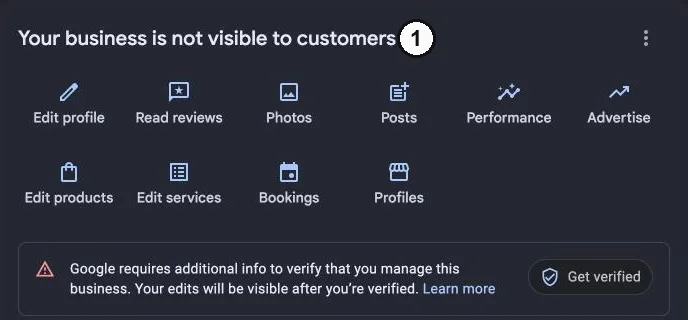
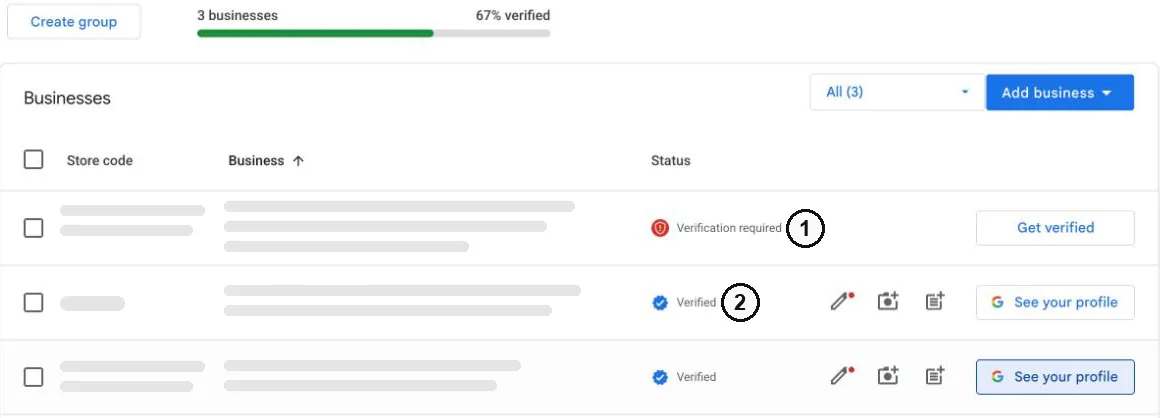
Your edits wait on it too: unverified, you can still change your name, category, address, hours, phone or website; to edit all your info, verify the profile.[3]
The fix is to verify. Which methods you're offered depends on your business type, public info, region or business hours; sometimes you need more than one. Our guide to verifying your Google Business Profile covers each.[4]
And if there's no profile at all, add your business or claim the one that exists, then verify. Start with listing your business on Google.[4]
Suspended, restricted or still under review
A verified profile can still disappear. Google suspends or disables profiles that don't follow its guidelines, and a removed profile is gone for the public until it's reinstated.[2]
Check the guidelines
Make sure the profile follows the guidelines before you appeal.[2]
Gather evidence
The appeals tool takes optional evidence: your registration, license, tax certificates or utility bills, with names and addresses matching the profile.[2]
Submit one appeal
Pick the profile and the decision, attach your files, and submit. Appeals can only be submitted once; the decision comes by email.[2]
Restrictions are a separate penalty for fake or incentivized reviews. A restricted profile may stop receiving new reviews for a while, have existing ones unpublished, or show a warning that fake reviews were removed. Google emails you first, and you can appeal.[5]
The quietest hold-up is an edit still under review. Each shows a status: Accepted means your updated info displays, Not approved means Google couldn't confirm it, Pending means still under review.[3]
Common reasons a verified profile still doesn't show
If your profile is verified and live, check these details first. Google says businesses with complete and accurate info are more likely to show up in local search results, and inaccurate info can keep a profile out of relevant searches in your area.[1]
- Your full street address, if customers can visit you.[1]
- Your business hours, including special hours.[1]
- What kind of business you are, which you set with your primary category and any others.[1]
Keep your name, address and phone the same on your profile, your website and your other listings, so nothing out there contradicts your profile. That's our advice, not a Google rule, and it makes mistakes easy to spot. If a business has closed or moved, change the profile rather than leaving old details up; how to remove your business from Google covers closing it.
Worked example · made by Local Biz Legends
Worked example: shown by name, missing for "plumber near me"
Three owners, one complaint, and only one has a broken profile. The fixes are completely different, so check in order.
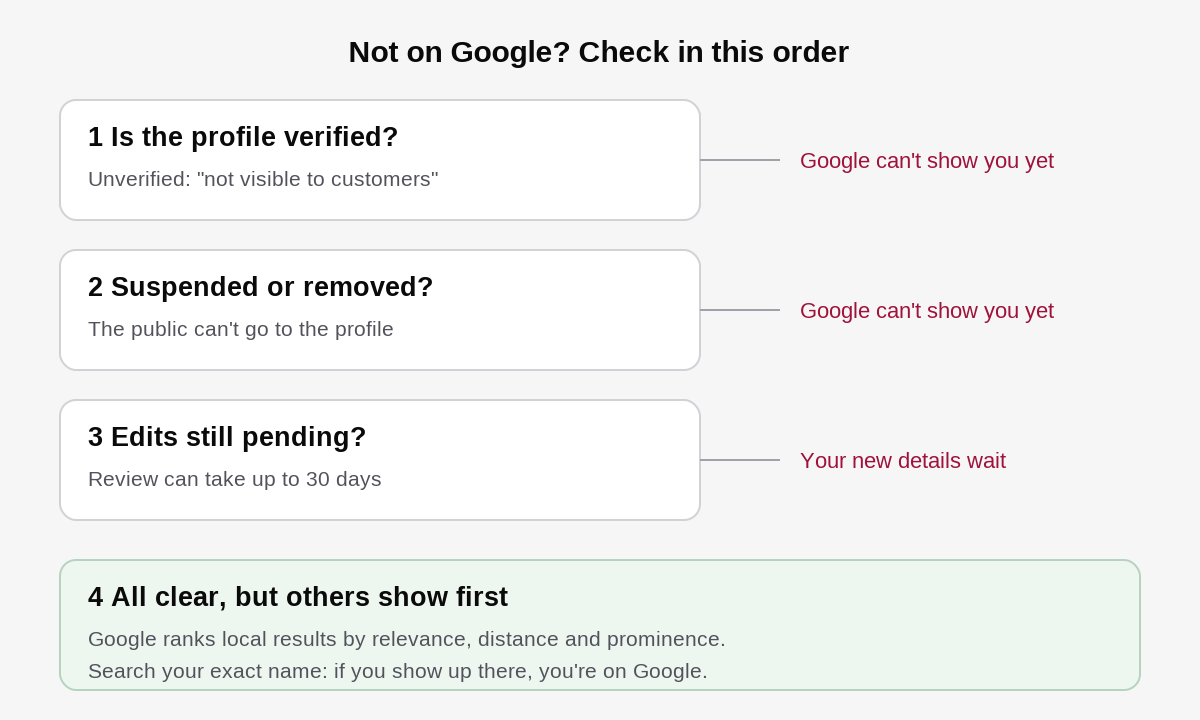
Three owners, three different problems
- A painter, never verified
- What's wrong: The panel says not visible to customers
- The fix: Verify the profile[4]
- A roofer, suspended
- What's wrong: Suspended over Google's guidelines
- The fix: Fix the issue, appeal once with evidence[2]
- A plumber, verified and accurate
- What's wrong: Nothing is wrong; the search is a different question
- The fix: Work on relevance, distance and prominence[1]
If you're the plumber, nothing is broken. Local results are mainly based on relevance, distance and prominence: relevance is how well your profile matches the search, distance is how far you are from the searcher, and prominence is how well known you are, counting links and reviews.[1]
Two of those you can work on. Complete, accurate info makes your profile more likely to show in local search, so fix any wrong details; and since prominence counts reviews, getting more Google reviews is the practical next step.[1]
You can't buy your way up: there's no way to request or pay for a better local ranking on Google. Spend the hour on your info and reviews instead.[1]
How long does it take for your business to show up on Google?
There's no single number: the wait depends on which check you're stuck at. Google does publish times for its own steps.
Verification is the longest. After you complete the steps, Google reviews what you provided, which takes up to 5 business days, longer on rare occasions. Some profiles are verified instantly, for example with Search Console.[4]
Edits are usually faster: Google says they take up to 10 minutes to review, sometimes up to 30 days. Until an edit is accepted and your updated info displays, customers still see the old details.[3]
What is my Google Business Profile ID?
Your Business Profile ID is a long number Google assigns to your profile. You'll find it in your Business Profile settings, under Advanced settings, where Google's own screen notes that you may be asked for it if you contact Support.
If you appeal more than 10 suspended locations at once, the tool needs each one's Business Profile ID in a spreadsheet.[2]
That's the checklist: search right, verify, clear suspensions and pending edits, then work on relevance, distance and prominence. If you'd rather someone else handled your Google profile, that's part of what we do.
Related help for owners
Rather have it done for you?
Get found everywhere people search. We do the work.
Questions owners ask
Why does my business show by name but not for "plumber near me"?
Because those are different searches. Your exact name has one good match: you. A category search is filtered by where the searcher is, then ranked on relevance, distance and prominence. Complete your info and earn reviews; that's the part you control. There's no way to pay for a better local ranking.[1]
My profile is suspended. Should I just make a new one?
No. Google says not to create a new Business Profile for the same business. Check the profile against the guidelines, gather evidence like your registration, license, tax certificates or utility bills, and submit one appeal. It can only be submitted once, and the decision comes by email.[2]
Why did my reviews stop showing on my profile?
One possible reason is a restriction. If Google decides fake or incentivized reviews broke its Fake Engagement policy, it can stop new reviews for a while, unpublish existing ones, or show customers a warning. It emails you first, and you can appeal.[5]
What does Pending mean on my Business Profile edit?
It means your edit is still under review. Edits to a verified profile are reviewed against Google's guidelines; most finish within about 10 minutes, some take up to 30 days. If Google can't confirm a change's accuracy, it may not approve it.[3]
How we checked this
Every fact comes from Google's Business Profile Help: its pages on local ranking, verification, suspended or disabled profiles, policy restrictions and edit review, read on 21 November 2026. The screenshots show Google's own owner panels, captured the same day.
Read our methodSources
Numbered in the order this page cites them.- 1Nov 21, 2026
- 2Nov 21, 2026
- 3Nov 21, 2026
- 4Nov 21, 2026
- 5Nov 21, 2026