Short answer
To list your business on Google, add or claim a Google Business Profile. It's free. Search first: no profile means you add one; an unverified listing means you claim it; a verified profile owned by someone else means you request ownership. Then verify. Once added and verified, customers can find your business on Search and Maps.[1][2][3]
Google's Business Profile Help pages on adding, claiming, verifying and requesting ownership, fetched 21 November 2026.

On this page
Before you start: what to have ready
Most small businesses can finish the form in one sitting. Write these down before you open it:
- Your business name, exactly as on your storefront, website and stationery. Nothing added: no taglines, no keywords, no phone numbers.[4]
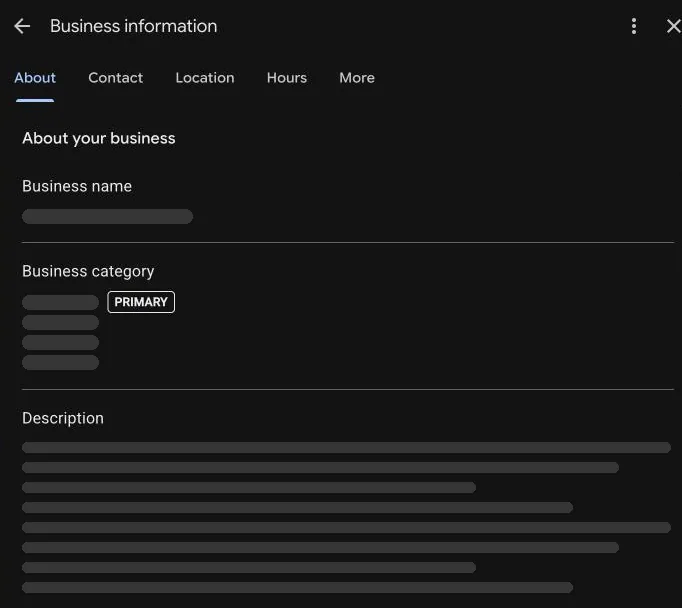
- One category, or the fewest it takes, to describe your core business. Think 'this business is a plumber', not a list of every service.[4]
- Your address if customers visit you, or your service area if you travel to them. No PO boxes.[4]
- A phone number that rings at your business, not a call center line.[4]
- Your website if you have one, and your regular customer-facing hours.[4]
- A Google Account, which you need to sign up. Any email address works.[3]
Check whether your business is already on Google
Search for your business name and city, the way a customer would. That's how Google says to find your profile.[3]
- Nothing comes up. Your business isn't on Google yet, so you add a new profile.[1]
- A listing is there but unverified. You claim it.[1]
- A listing is there, verified, owned by someone else. You request ownership from the current owner.[2]
Claiming runs from Google Maps: select your business, then Claim this business, Manage now, and pick a verification option.[1]
No Claim this business button? You might already be the owner: sign in with the Google Account tied to the profile.[2][3]
Requesting ownership also starts at business.google.com/add: enter your business name and address, choose your business, and select Request Access when Google warns that someone else may manage the profile.[2]
How to add your business to Google, step by step
No profile exists? Google's steps:[1]
Open the add page
Go to business.google.com/add.[1]
Start
Select Add your business to Google.[1]

The add page opens with a search. If your business doesn't come up, Add your business to Google (1) starts a new profile.Screenshot by Local Biz Legends, Nov 21, 2026 Enter your details
Follow the on-screen instructions to add your details.[1]
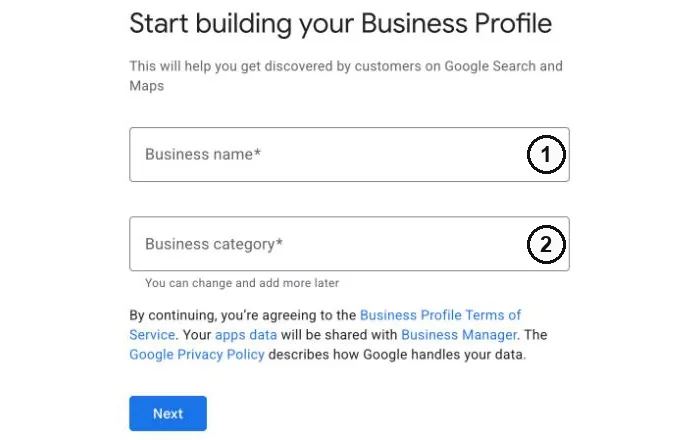
The first details Google asks for: your business name (1) and category (2). Next accepts Google's terms, so read them first.Screenshot by Local Biz Legends, Nov 21, 2026 Verify
Select a verification option and follow the on-screen steps.[1]
No storefront? You're a service-area business: one profile for your central office or location, your towns as the service area, your street address hidden from customers.[4]
Both? An auto repair shop with a garage that also does roadside service can show its storefront address and set a service area.[4]
Worked example · made by Local Biz Legends
Worked example: claim, add, or request ownership?
One search, three owners, three routes:
Three owners, three routes
- Maria cleans houses from her apartment
- What the search shows: No profile comes up
- The route: Add a new profile and hide her address[1][4]
- Denise just bought a tree firm
- What the search shows: An unverified listing is already up
- The route: Claim it, then verify[1]
- Raj's pub used a marketing agency years ago
- What the search shows: A verified listing is owned by the agency's old account
- The route: Request ownership; the owner has 3 days to respond[2]
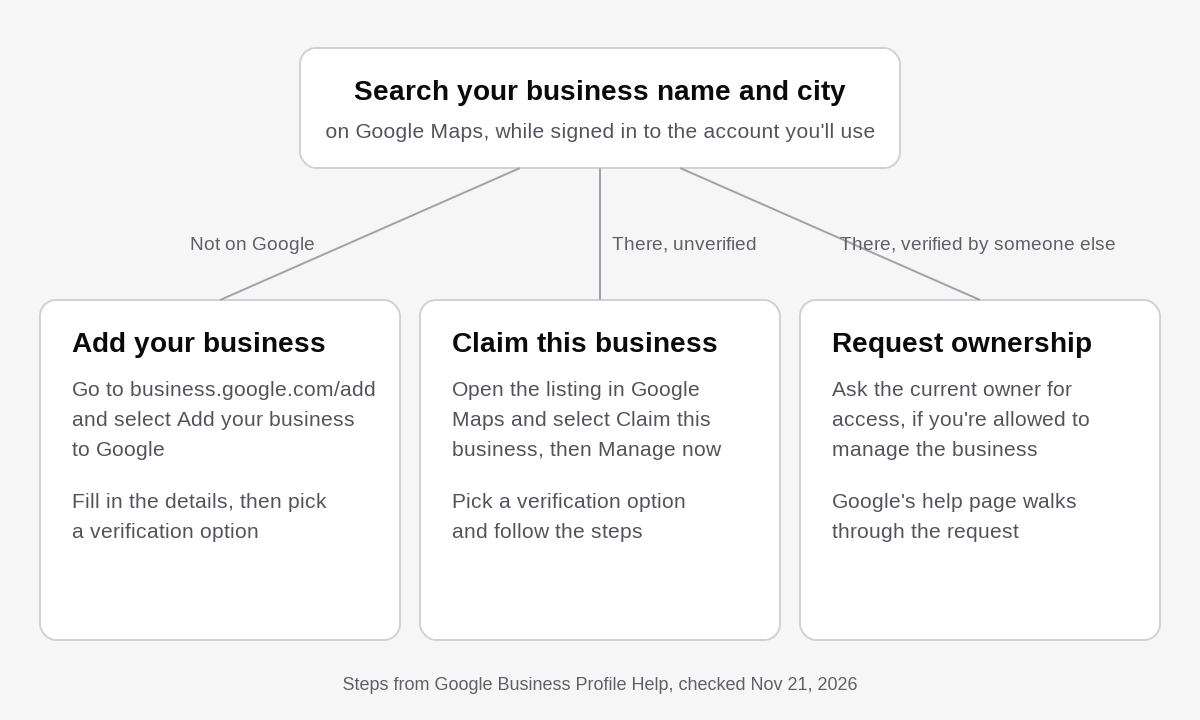
Maria adds because nothing exists. Denise claims what's already there. Raj requests ownership from the old agency. One search picks your route too, and it stops you making two profiles for the same business. Contractors who work from home have one more choice to make first, and Google Business Profile for contractors covers it.
Verify your profile
Verification is what gives you the profile. Until you verify, you can't edit your business info on Google or interact with customers.[3]
Google picks the method from your business type, public info, region and hours, and you can't change it. Most postcard codes arrive within 14 days, and the review after you enter the code takes up to 5 business days.[3]
If your profile shows as already verified, you can skip this. Every method, including what to show on a live video call, is in verifying your Google Business Profile.
What to fill in once you're live
Once you've added or claimed your profile, you control how your business information shows up on Google:[1]
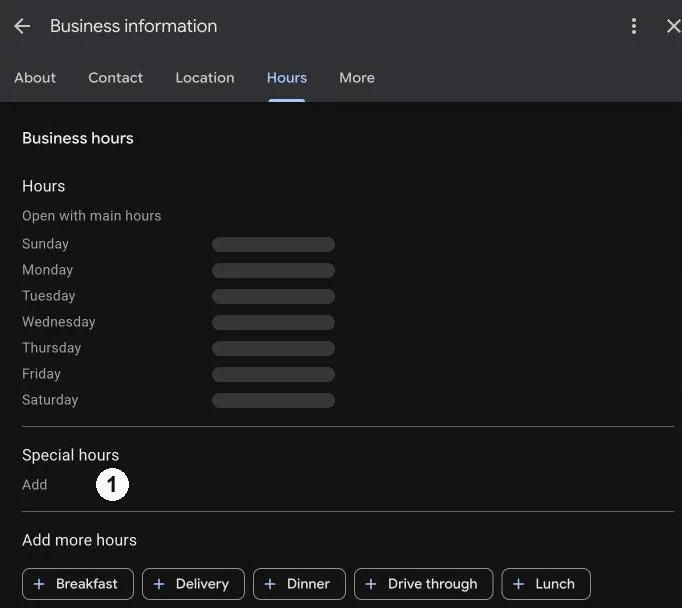
- Hours, kept current, including seasonal hours and special hours for holidays. The steps for each edit are in how to change your hours, address and phone.[4]
- Photos of real jobs, your team, your storefront.
- A description that's upfront and honest about your services: no links, no prices, no promotions.[4]
- Reviews. Ask every customer while the job is fresh (how to get more Google reviews has the link and the rules), and reply to every one: start with how to reply to Google reviews.
For reviews that break the rules, how to remove Google reviews covers what breaks Google's policy and how to report it.
If you'd rather someone else handled your Google profile, see how we work with local business owners.
Related help for owners
Rather have it done for you?
Get found everywhere people search. We do the work.
Questions owners ask
How do I have my business come up on Google?
Add or claim a Google Business Profile, then verify it. When you add and verify your Business Profile, customers can find your business on Search and Maps. There's no other switch to flip, and no guarantee of where Google shows you: keep your details complete and accurate.[1][3]
How do I create a Google Business listing?
Set up a free Business Profile. Go to business.google.com/add, select Add your business to Google, and enter your business details: name, category, business address or service area, phone and website. Then pick a verification option. If Google Maps already shows your business, claim that listing instead of adding a second one.[1]
Can I have multiple businesses under one Google Account?
Yes, but the limit is on profiles, not accounts. There should only be one profile per business: duplicates cause problems with how your information displays on Google Maps and Search. Separate locations with separate staff are each allowed one profile. More than one page for the same location, in one account or across several, breaks the rules.[4]
How much does it cost to list my business on Google?
Nothing. You can add or claim your business at no charge. Your verification code is yours to keep: Google will never ask you for it, so never share it with anyone, even someone who offers to manage your profile for you.[1][3]
Can I list my business on Google without an address?
Yes. If you travel to customers and have no storefront, you're a service-area business: one profile for your central office or location, your towns set as the service area, your street address hidden. A rented address you don't operate from, a virtual office, isn't eligible.[4]
How we checked this
We checked every step and rule on this page against Google's Business Profile Help pages on adding, claiming, verifying and requesting ownership, fetched 21 November 2026, and copied the supporting lines word for word into the evidence list.
Read our methodSources
Numbered in the order this page cites them.- 1Nov 21, 2026
- 2Nov 21, 2026
- 3Nov 21, 2026
- 4Nov 21, 2026