Short answer
A Google Business Profile is the listing that shows your contracting business on Google Search and Maps. It matters for contractors because many of you work at customers' homes, and Google has a setup for exactly that: the service-area business. You list the areas you serve, and if nobody visits your own address, you clear it from the profile.[1][2]
Based on Google's own Business Profile help pages on service areas, addresses, verification and profile content, read on 22 November 2026.
On this page
What is Google Business Profile?
Your Google Business Profile is what shows your business on Google Search and Maps. Any business can create one, whether customers visit you or you travel to them. You control the details once you claim and verify the profile.[1][3][4]
No profile yet? Start with how to list your business on Google. It covers adding a business from scratch and claiming one that already exists.
Storefront, service-area or hybrid: pick yours first
For Google, the first question is where the work happens. A service-area business visits or delivers to customers directly but doesn't serve them at its own address; Google's examples are cleaning services and plumbers. A hybrid serves customers at its address and also travels to them. Without permanent on-site signage you're not eligible as a storefront, so Google says to list it as service-area.[2]
Whichever you pick, the count rule holds. A service-area business can only have one profile for the whole area it serves, and only one profile per business should exist overall. Separate locations with separate service areas and staff may have one each.[2][3]
Set your service area
Your service area shows customers where you can provide your products and services, and setting it helps people find your profile.[2]
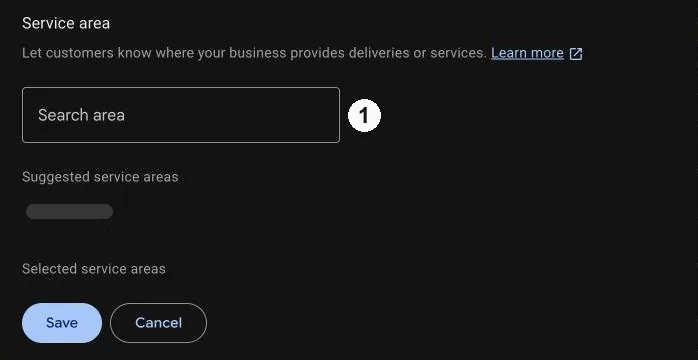
Open the Location tab
Go to your Business Profile, then select Edit profile and Location.[2]
Choose your areas
Next to Service area, select Edit. Pick a suggested service area or enter your own by city, postal code or other area, up to 20 in total.[2]
Save
Select Save. Approved service-area edits can take up to 48 hours to show on your profile.[2]
You can't set a radius around your business, only cities, postal codes or other areas. And the boundary shouldn't be more than about two hours of driving time from where you're based, so be specific and accurate.[2]
Worked example · made by Local Biz Legends
Worked example: three contractors, three setups
One question decides the whole setup: do customers come to you, do you go to them, or both?
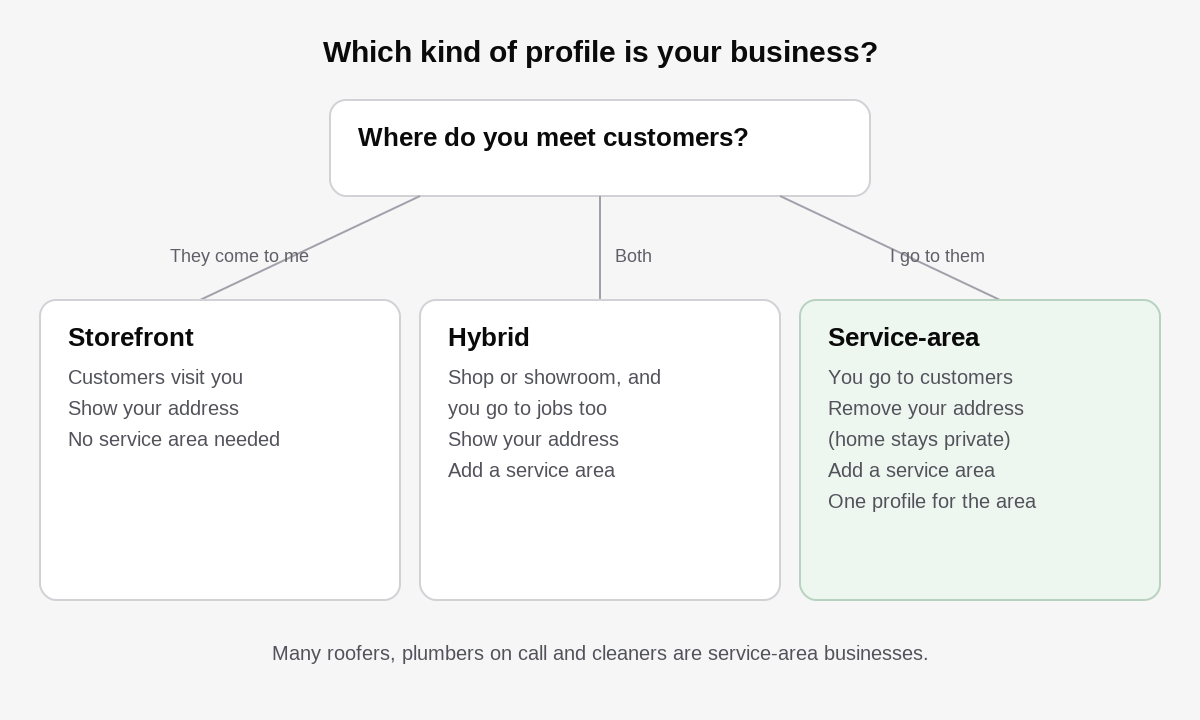
- A roofer working from home. No customer ever knocks, so she is a service-area business. She clears her home address and lists her towns; Google's guidance for a plumber at a residential address covers her too.[3]
- A plumber with a shop customers visit. People walk in, the sign is fixed to the building, so he shows his address and sets his shop hours; Google expects permanent fixed signage at any shown address.[3]
- A remodeler with a showroom who also goes to jobs. Clients visit to pick finishes and her crews work in their kitchens, so she is a hybrid: address shown, hours for when the showroom is staffed, plus a service area.[2]
Changing type later? Google's rule: serve customers at your address and also have a service area, enter both; don't serve customers at your address, remove it and enter only your service area.[2]
How do you verify a business address?
Verification is how Google checks the profile is really yours: you need it to edit your business info or interact with customers, and once it's done you gain ownership. No shop needed: Google picks the methods itself, the options you see depend on your business type, public info, region and business hours, and the menu can include phone or text, email, a live video call or a postcard in the mail.[4]
For the step-by-step, including what to do when an attempt fails, read our guide to verifying your Google Business Profile.
What to fill in for a trade
Start with the name, and use your real-world name only: the one on your truck door, invoices and signage. Unnecessary information there, keywords, cities or phone numbers, can get the profile suspended.[3]
Pick the fewest categories that describe your overall core business, and make them as specific to your trade as Google's list allows, rather than a vague catch-all. Then fill the services list: a service may be highlighted on your profile when local customers search for it, and Google suggests options tailored to your trade. Custom services are allowed too.[3][5]
Set your regular customer-facing hours, unless you work only by appointment: Google says businesses that operate only by appointment shouldn't provide hours. Then add photos of your real jobs: your own photos help customers recognize your business on Google.[1][3]
You can edit your Google Business Profile any time details change. Ask happy customers for reviews, starting with our guide to getting more Google reviews. If you'd rather someone else handled your Google profile, see how we do that in Get Found. Writing your services list from scratch? ChatGPT for small business has prompts for drafting it; check every line before you save.
Related help for owners
Rather have it done for you?
Get found everywhere people search. We do the work.
Questions owners ask
Can a contractor show a home address on a Google Business Profile?
You can enter one; Google needs an address it can find to verify your business. But if no customer visits your home, you shouldn't show it: the address on a profile is public, and Google lets a service-area business stop showing it and list the service area instead.[1][3]
How many service areas can a Google Business Profile have?
Up to 20, based on the cities, postal codes or other areas you serve. You can't set a radius distance around your business: if you set one up that way before, you can't edit it. The boundary shouldn't be more than about two hours of driving time from where you're based.[2]
Can a contractor have more than one Google Business Profile?
Not for the same business. A service-area business can only have one profile for the whole area it serves, and there should only be one profile per business overall. The exception: separate locations with separate service areas and separate staff may have one profile each.[2][3]
How we checked this
We checked every claim on this page against Google's Business Profile help pages on service areas, business guidelines, addresses, verification and services, as fetched on 22 November 2026, and rebuilt the setup steps from those pages' current screens.
Read our methodSources
Numbered in the order this page cites them.- 1Nov 22, 2026
- 2Nov 22, 2026
- 3Nov 22, 2026
- 4Nov 22, 2026
- 5Nov 22, 2026