Short answer
How do you get more Google reviews? Ask every customer, right after the job. Google gives you a review link and a QR code in your Business Profile under Read reviews, then Get more reviews. Share them by email, WhatsApp or Facebook. Never pay for a review or offer a discount; asking is free.[1][2][3]
Google's Business Profile help pages and the Maps user generated content policy, read on 2026-11-21.

Get your review link and QR code from Google
For a small business, reviews sit right next to your profile in Google Maps and Search, and they give potential customers helpful info before they call. They count in local SEO too: Google says prominence, one of the things that decides local results, is partly based on how many reviews you have.[2][4]
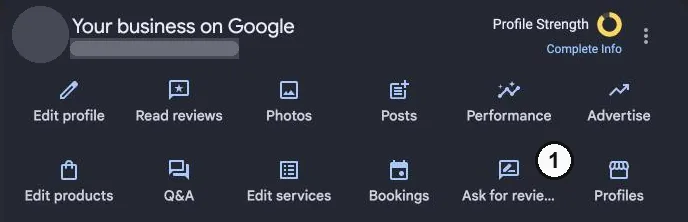
Google builds the asking into your Business Profile. Signed in as the owner, you open Read reviews, then Get more reviews, and Google hands you a short link and a QR code for your review form. If you haven't verified your profile yet, our verification guide walks you through it.[1]
Open your profile
On a computer, go to your Business Profile.[1]
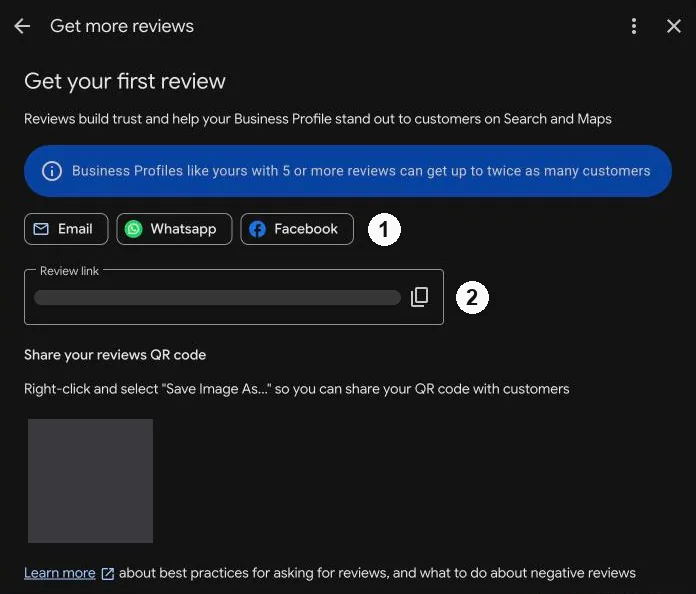
Select Read reviews, then Get more reviews
The dialog opens with your review link and QR code. The Ask for reviews button in your profile's panel opens the same dialog.[1]
Copy the link
Select Copy to copy the review link.[1]
Save the QR code
Right-click the QR code and select Save image as.[1]
From the same dialog you can send the request by email, WhatsApp message or Facebook post.[1]
One limit: Google makes the review QR code on a computer browser only, not on a phone.[1]
When and how to ask
Ask every customer, every time, right after the job is done. Google's own advice is to remind customers to leave reviews, with a link or a QR code. Put that link where customers already are:[2]
- On the receipt.[1]
- In the thank-you email.[1]
- At the end of a chat, once the problem is solved.[1]
- Printed as a QR code and displayed in your store.[1]
The right moment is the minute the customer sees the result: the leak is dry, the lawn is striped, the car is clean. That's when a review is easy to write. If it's the first time you've asked anyone, start with every customer from the past week, not only the regulars. In an email or text, put your business name in the first line so the customer knows who the review request is from. Drafting the ask message with ChatGPT? Read what to keep out of it first, and never paste in a customer's details.
Keep the ask short. In person: 'Glad you're happy with it. Would you leave us a Google review? This card has the code.' In a text later: 'Thanks for having us today. A Google review means a lot to a small firm. Here's the link.' Ask once, take no for an answer. Google's policy adds two limits: don't require or pressure anyone to review while they're still on the premises, and never ask for specific content in the review.[3]
One practical thing: customers must be signed into a Google Account to leave a review, and they can set one up with a non-Gmail email address.[2]
Can you incentivize people to leave Google reviews?
No. Offering customers an incentive for a review breaks Google's policy: no payment, no discount, no free goods or services. It counts as fake engagement, and covers posting, changing or removing a review.[1]
In the United States it also breaks an FTC rule: 16 CFR Part 465 bans compensation or other incentives conditioned, expressly or by implication, on a review's sentiment, positive or negative. We quote the rule; this page isn't legal advice.[5]
Two more habits count as manipulation. Don't gate reviews by asking only the customers you expect to be happy: Google's policy bans selectively soliciting positive reviews. Don't discourage the negative ones.[3]
Worked example · made by Local Biz Legends
How many 5 star reviews do I need to increase my rating on Google?
Google's review score is the average of all the ratings published for your business.[6]
The scale runs from 1 to 5 stars, with 5 the highest.[6]
Say your profile sits at 4.2 and you want 4.5. Each new 5-star review pulls the average up, and the more reviews you have, the less each one moves it.
New 5-star reviews to lift a 4.2 average to 4.5
- 20
- New 5-star reviews: 12
- Reviews after: 32
- 50
- New 5-star reviews: 30
- Reviews after: 80
- 100
- New 5-star reviews: 60
- Reviews after: 160
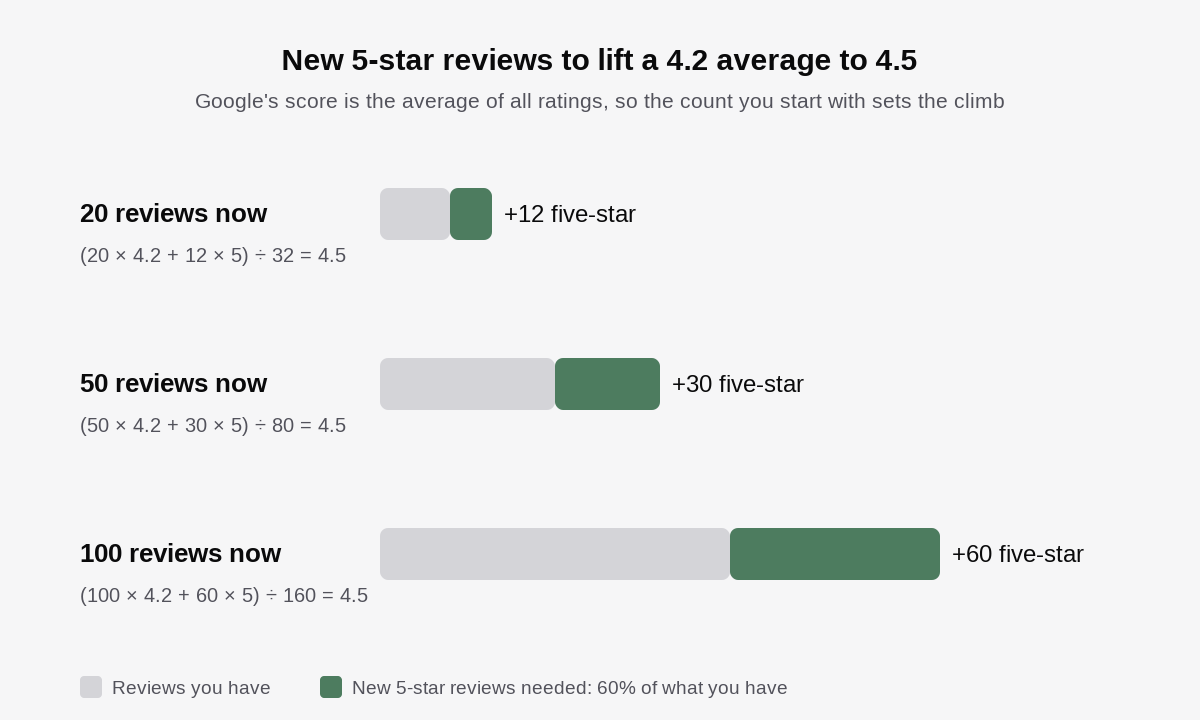
From 4.2 to 4.5 the pattern holds at any size: six new 5-star reviews for every ten you already have. Twenty reviews need twelve; a hundred needs sixty. A different start or target changes the ratio.
One patience note: a new review can take up to 2 weeks to show in the score.[6]
Reply to the reviews you get
Replying is part of the job. Google's tips page puts it simply: replies show customers that their feedback matters.[2]
A mix of positive and negative feedback often feels more trustworthy, so a critical review isn't a disaster. Read it, fix what's real, and say what you did.[2]
Keep replies short, polite and free of offers. Our full guide on replying to Google reviews has scripts for the awkward ones.
If a review actually breaks Google's policies, you can flag it. Report real policy breaks, not reviews that are merely harsh. Our guide on removing a Google review shows when and how.[2]
Make asking a routine: every job, one ask, one reply. If you'd rather someone else handled your Google profile, that's what we do.
Related help for owners
Rather have it done for you?
Get found everywhere people search. We do the work.
Questions owners ask
How to encourage customers to leave Google reviews?
Ask in person right after the job, then follow up with your review link by text or email. One short sentence, ask everyone, offer nothing. Put the link on receipts and thank-you emails, or hand over a card with the QR code, and reply to each review you get.[1][2]
Can I offer a small discount for an honest review?
No. Google's policy covers content posted due to an incentive offered by a business, and lists payment, discounts and free goods or services as incentives, whatever the review says. In the United States the FTC's review rule separately bans incentives tied to a review's sentiment. Google's ban is the wider one: ask for the review and offer nothing.[3][5]
Should I only ask happy customers for reviews?
No. Asking only the customers you know are happy, or steering unhappy ones away from reviewing, is something Google's policy tells merchants not to do. Ask every customer the same way. Critical reviews show you what to fix, and a reply shows everyone you care.[3]
How long does a new review take to show in my rating?
Up to 2 weeks, by Google's own account: after someone leaves a new review, the review score can take that long to update. So a fresh 5-star that hasn't moved your average yet may simply be early; give it the full two weeks before you wonder.[6]
How we checked this
Every fact was checked against Google's Business Profile help pages, the Maps User Generated Content Policy and the FTC's review rule (16 CFR Part 465), each read on 2026-11-21. The table's arithmetic is ours, worked from Google's description of the score as an average.
Read our methodSources
Numbered in the order this page cites them.- 1Nov 21, 2026
- 2Nov 21, 2026
- 3Nov 21, 2026
- 4Nov 21, 2026
- 5Nov 21, 2026
- 6Nov 21, 2026