Short answer
To reply to Google reviews, open your Business Profile, choose Read reviews, then Reply next to the review. Thank the customer, mention the job, and keep it to two or three sentences. For a bad review, stay calm and offer to sort it out by phone. Google checks each reply before it shows publicly.[1]
Steps and timing from Google Business Profile Help, checked Nov 21, 2026.
On this page
How to reply to a Google review, step by step
You can reply once your Business Profile is verified. If it isn't yet, start with getting your business on Google and verifying the profile; claiming your free listing on Local Biz Legends doesn't replace Google's own verification.[1]
Open your Business Profile
Sign in with the Google account that manages the profile, then search for your business name on Google or open it in Google Maps.[1]
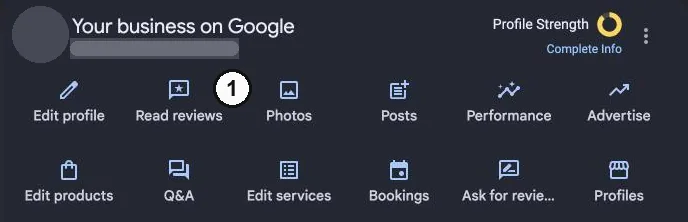
Signed in as the owner, search your business name and this panel sits at the top of the results.Screenshot by Local Biz Legends, Nov 21, 2026 Choose Read reviews
Your reviews are listed there, each with a Reply option next to it.[1]
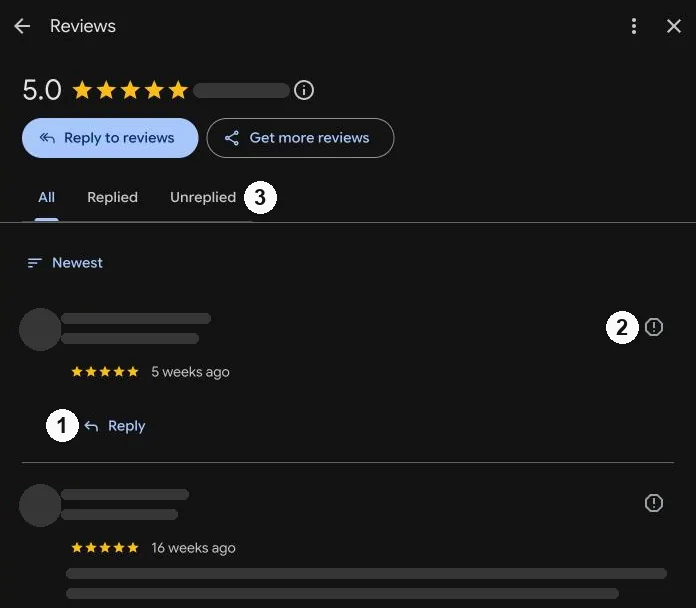
Each review has its own Reply button (1) and report icon (2); the Unreplied tab (3) shows what's still waiting. Names, photos and review text are hidden.Screenshot by Local Biz Legends, Nov 21, 2026 Select Reply, write, and post
Type your reply in the box and select Reply again to send it. Google checks it against its content policies, usually within ten minutes and sometimes up to thirty days, and asks you to edit it if it can't be posted.[1]
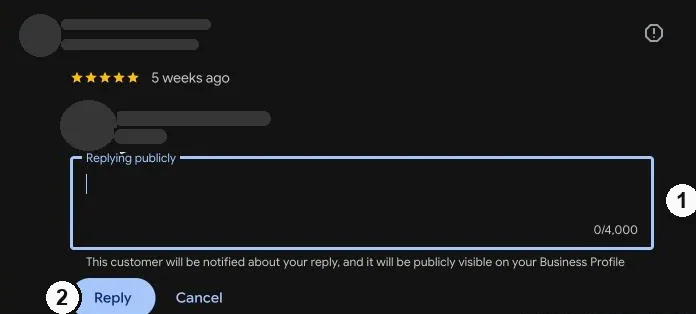
Google says it plainly under the box: the customer is notified and the reply is public. Names, photos and review text are hidden.Screenshot by Local Biz Legends, Nov 21, 2026 Edit or delete it later if you need to
Under your reply, select Edit to change it or Delete to remove it. The customer can also change their review after reading your reply, and the review's date updates when they do.[1]
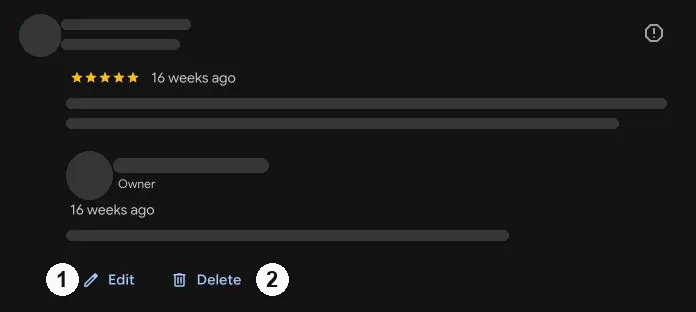
A posted reply keeps Edit (1) and Delete (2) underneath it, so a reply can be fixed later. Names, photos and review text are hidden.Screenshot by Local Biz Legends, Nov 21, 2026
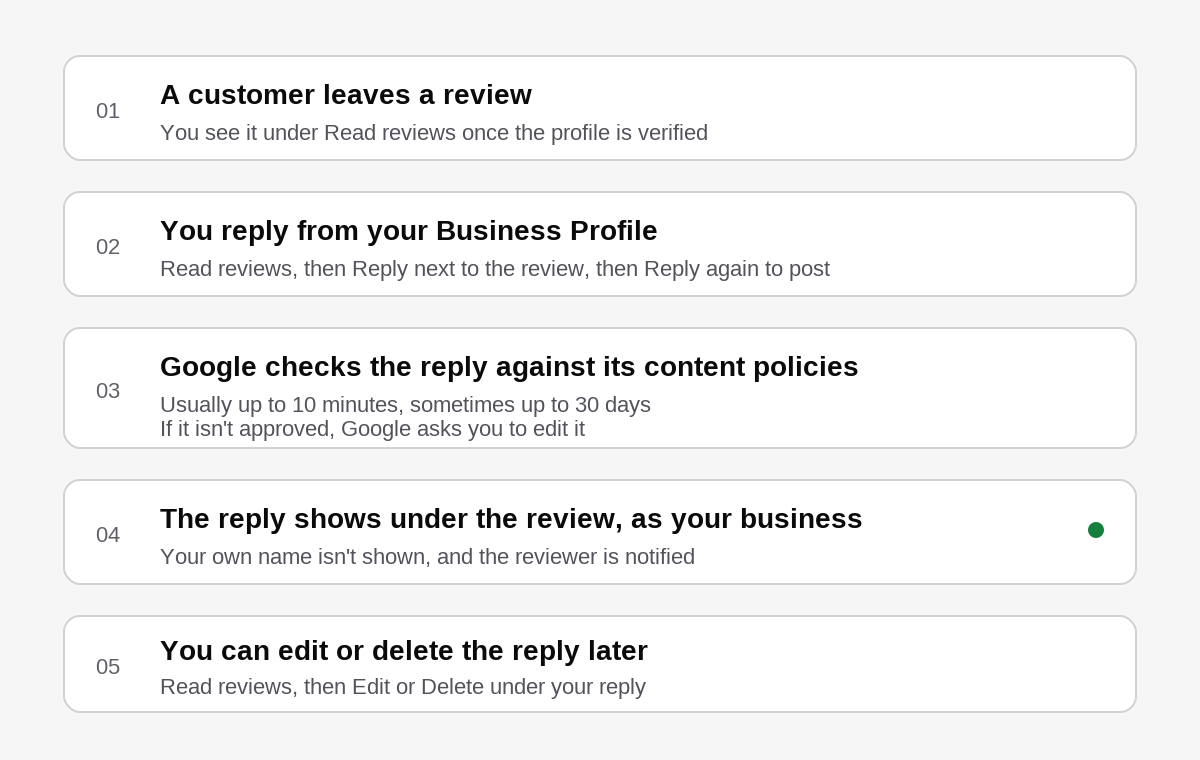
Your reply shows under the review as your business, not under your own name, and the person who wrote the review gets a notice that you replied. Write it for them and for every customer who reads the review after them.[1]
How to reply to a positive review
A good reply to a positive review is short and specific. Use their first name if the review shows it, thank them, and name one detail of the job, such as the water heater, the kitchen, or the person who did the work. A detail tells the next reader that a person read the review, and it reads better than the same line pasted under every five stars.
- Thank them by name, once. One thank you is enough.
- Mention the job or the crew member they praised, so the reply couldn't sit under anyone else's review.
- Invite them back for the next job if it fits, without a sales pitch or a link.
Five stars with no words still deserve a line. Something like "Thanks, Dana. Glad the furnace is running again" takes ten seconds and shows the profile is looked after.
How to reply to a negative or unfair review
A negative review deserves one calm reply, not an argument. Wait until you're calm, then reply once. Say you're sorry the visit went badly, state any fact the reader needs without arguing, and give a way to reach you directly so the rest happens off the page. A future customer is judging how you handle a problem more than the problem itself.
Mixed reviews, with praise for the work and a complaint about timing or price, get both halves: thanks for the kind words, and one sentence on the complaint and what you'll do about it.
Worked example · made by Local Biz Legends
Example replies for trades and local services
We wrote these review responses for plumbers, HVAC firms, cleaners and any local business that works in people's homes. Change the names and the job to match the review; never paste one unchanged under every review. If you draft replies with ChatGPT, read what to keep out of it first, and edit every draft.
Example replies by situation, written by Local Biz Legends
- Five stars, no comment
- Thanks, Mike. Glad we could get the leak sorted the same day.
- Five stars, names a crew member
- Thank you, Priya. I'll pass this on to Luis; he takes real care on install days.
- Mixed: good work, late arrival
- Thanks, Sam, and sorry we were late on Tuesday. We've changed how we schedule morning calls so it doesn't happen again.
- One star, a real problem
- I'm sorry the repair didn't hold, Chris. Please call me on the office line so we can come back and put it right.
- One star, someone you never served
- We can't find a job under this name, and we'd like to understand what happened. Please call the office so we can look into it.
What to leave out of a reply
Everyone can read a reply, so keep private details out of it: addresses, phone numbers other than your business line, invoice amounts and anything about the customer's home or health. Google's content policies also bar harassment and personal information in what's posted.[1][3]
Don't offer a discount or a gift in exchange for changing a review. A federal rule bans rewards that depend on what a review says, and Google's policies bar incentives for reviews too.[3][4]
A ten-minute weekly routine
Online reviews keep coming, so give them a slot. Pick one time each week, such as Friday afternoon, open Read reviews and answer the new reviews, oldest first. Fake reviews go to the report flow instead of a reply. Bad reviews get a reply within a day or two when you can manage it. To bring more reviews in, see how to get more Google reviews. If you'd rather someone else looked after your Google profile, that's what Get Found is for, and the rest of our help for owners covers the other parts of your profile.
Related help for owners
Rather have it done for you?
Get found everywhere people search. We do the work.
Questions owners ask
How do I reply to a good review?
Open your Business Profile, choose Read reviews and select Reply next to the review. Thank the customer by name, mention one detail of the job, and keep it to a sentence or two. Google checks the reply against its policies before it appears under the review as your business, usually within ten minutes and sometimes up to thirty days.[1]
How to reply in a positive way?
Start with thanks, not a defence. Name the person and the job, say one specific thing you appreciated or fixed, and end with an open door, such as calling the office. Even when the review is a complaint, a calm and specific reply shows the next customer how you treat people when something goes wrong.[1]
Can I delete a bad review instead of replying?
No, an owner can't delete a customer's review. If it breaks Google's content policies, for example spam, abuse or a review from someone who was never a customer, you can report it from your profile and Google decides. Otherwise the honest route is a calm reply that shows how you handle problems.[2][3]
Can I change my reply after posting it?
Yes. Open Read reviews on your Business Profile, find your reply, and select Edit to change it or Delete to remove it, then select Update to save an edit. The customer can also update their review after reading your reply, and the review's date changes when they do.[1]
How we checked this
We checked every step against Google's own help pages on the date shown, and wrote the example replies ourselves for trade and local service owners. Google changes its screens from time to time; if a button has moved, tell us and we'll update the page.
Read our methodSources
Numbered in the order this page cites them.- 1Nov 21, 2026
- 2Nov 21, 2026
- 3Nov 21, 2026
- 4Nov 21, 2026