Short answer
You can't delete a customer's Google review yourself. To remove Google reviews that break Google's policies, you report them from your Business Profile, and Google decides which ones come down. The person who wrote a review can still change it. For a review that breaks no rule, reply once, calmly, and move on.[1][2]
Google's Business Profile Help pages and the Maps User Generated Content Policy, fetched 21 November 2026.
On this page
Can you remove a Google review?
You can't take a customer's review down yourself. The removal tool Google gives you is a report: you flag the review, and Google decides whether it comes down. Taking the whole business off Google is a different job: how to remove your business from Google.[1]
The review belongs to whoever wrote it. They're notified when you reply, and they can still change their review after reading it. A calm reply sometimes settles it without a report.[2]
Both moves start from your Google Business Profile. No profile yet? Start with how to list your business on Google. Not verified? Replies stay locked until you verify: see verifying your Google Business Profile.[1][2]
Does the review break Google's rules?
Google's Maps User Generated Content Policy says a review should reflect a genuine experience at a place or business. Check your review against this list before reporting:[3]
- Not a real experience. It isn't based on an actual visit.[3]
- Spam. The same text posted again and again, from one account or many.[3]
- Off topic. A political rant, a personal grudge, or an ad.[3]
- Conflict of interest. A competitor, a former employee, or a relative.[3]
- Harassment. Threats, hate, or content posted to harass you or your staff.[3]
- Personal information. A face, full name, or phone number posted without consent.[3]
Then the ones that stay. A one-star review from a real customer who had a bad day or remembers the job differently is still a real review. Google allows negative experiences told respectfully.[3]
One more rule. A review someone agreed to change or remove for an incentive breaks the policy. Never trade money, discounts, or free work to get a review changed or taken down.[3]
How to report a Google review
The report runs from your profile:[1]
Open your profile
Go to your Business Profile.[1]
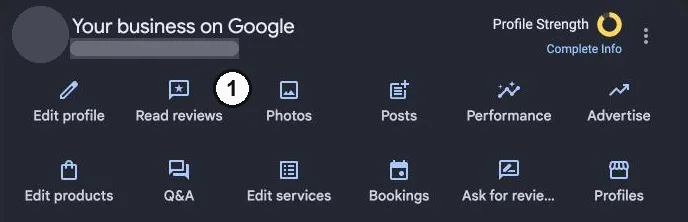
Reporting starts where replying does: open Read reviews from your profile's panel in Google Search.Screenshot by Local Biz Legends, Nov 21, 2026 Open your reviews
Select Read reviews to open the list.[1]
Select Report
Next to the review, select Report.[1]
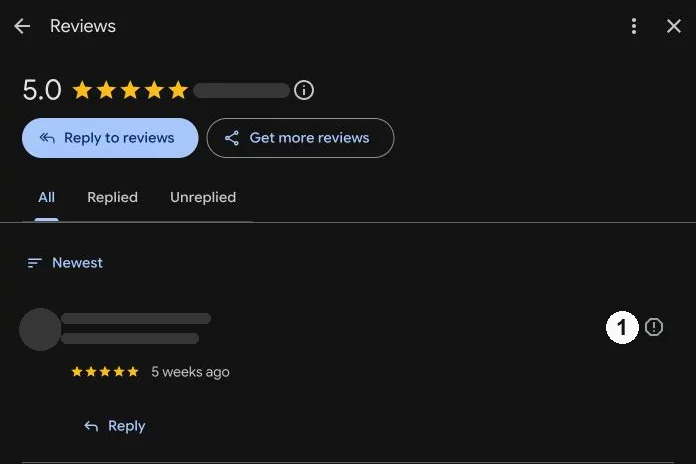
The report icon (1) sits beside each review; it opens Google's list of reasons. Names, photos and review text are hidden.Screenshot by Local Biz Legends, Nov 21, 2026 Pick the reason
Select the reason, such as Spam or Profanity.[1]
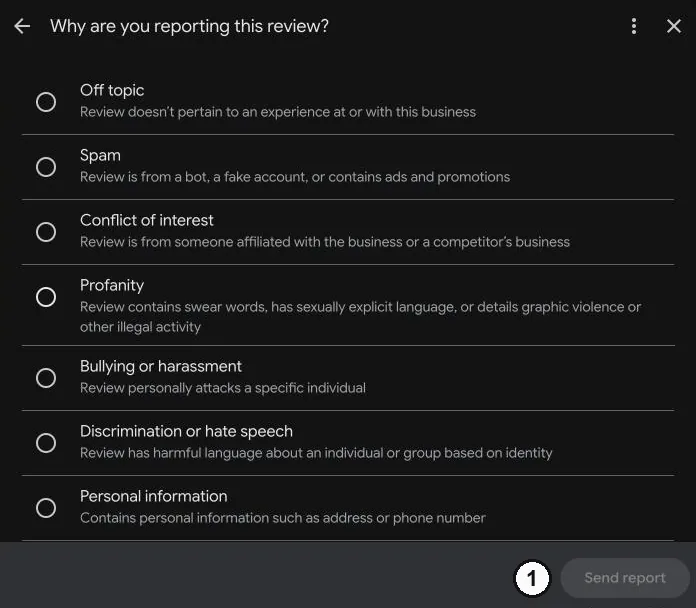
Google's own reasons, each with a one-line description. Send report (1) stays grey until you pick one.Screenshot by Local Biz Legends, Nov 21, 2026 Send the report
Select Send report.[1]
Check the status
Evaluation typically takes several days. Check the status in the Reviews Management Tool.[1]
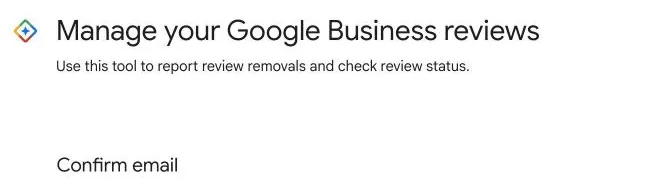
Google's Reviews Management Tool, where a report's status shows up. It first asks you to confirm the account that manages the profile.Screenshot by Local Biz Legends, Nov 21, 2026
A no-violation answer still leaves one move: a one-time appeal from the same tool.[1]
The appeal is the last move here: a review that complies with Google's policies remains live.[1]
Worked example · made by Local Biz Legends
Worked example: report or reply?
Three reviews, one shop, one week:
Three reviews, three routes
- One star from a name that never booked a job with you
- What it is: Posted to undermine a business
- The route: Report it; let Google decide[3]
- Two stars from a real customer whose repair ran long
- What it is: A negative experience, told respectfully
- The route: Reply once; don't report[1]
- Four stars, but the customer left their own phone number
- What it is: Personal information in a review
- The route: Report it[3]
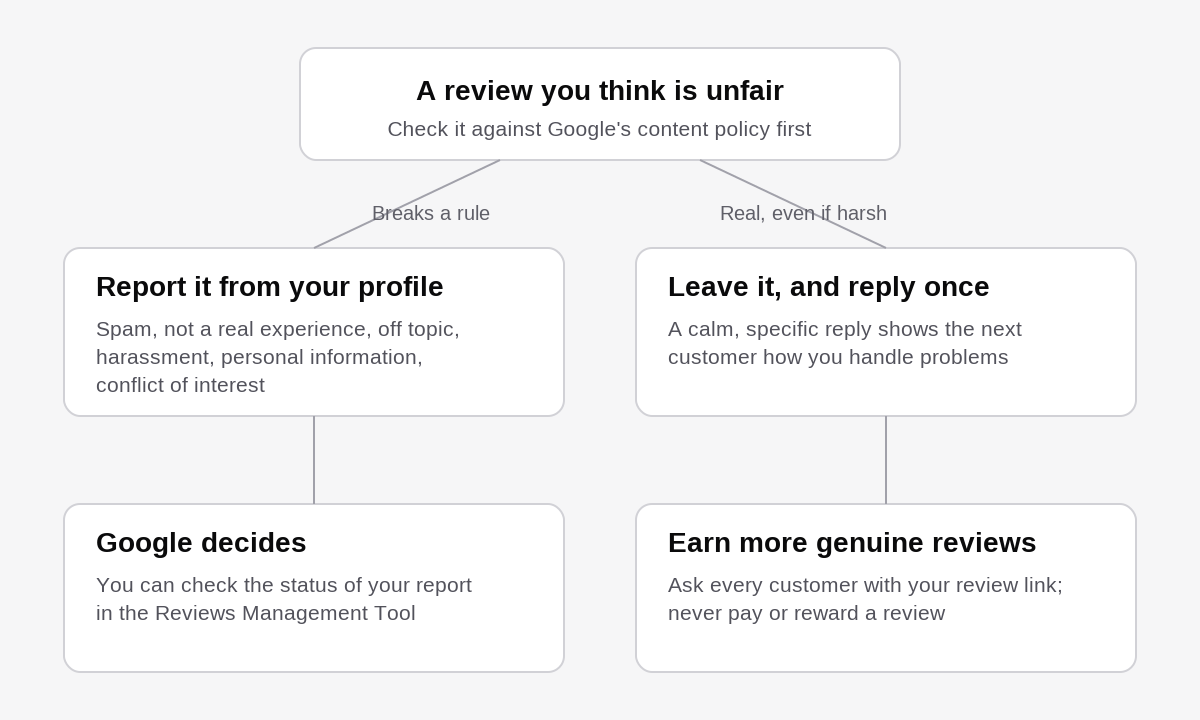
The question is whether the review violates Google's policy, not how much it stings. Google makes the final decision; your job is to pick the right route. Report the ones that do, reply to the rest.
If the review stays up
Some reports come back with no violation, and some reviews never broke a rule. Once the report and appeal are done, the review is staying. What you control is your reply: work through how to reply to Google reviews and post it.[1]
Your reply is posted publicly under the review. Keep it short and level: state what happened, own your part, offer the fix. You're writing for future customers too.[2]
Then outnumber it. Keep asking every customer for a review; Google lets you share a review request link or QR code. Never attach a reward: reviews posted for an incentive aren't allowed either. Our guide to getting more Google reviews covers when and how to ask.[2][3]
Watch out for removal offers and extortion
Companies sell 'Google review removal'. Google decides removals through the policy process above, and you can file the report yourself. Paying scammers encourages more attempts and doesn't guarantee removal.[1][4]
The nastier version is review extortion: a sudden increase in 1-star and 2-star reviews, then a demand for money, goods or services to take them down.[4]
Screenshot every demand so the sender and the ask are visible, and link the reviews you believe are part of it.[4]
A review you want to fight in court is a lawyer matter. Google's report process isn't a court, and we don't give legal advice.
If you'd rather someone else handled your Google profile and its reviews, see how we work with local business owners.
Related help for owners
Rather have it done for you?
Get found everywhere people search. We do the work.
Questions owners ask
How do I get Google to remove a review?
Report it from your Business Profile: open Read reviews, select Report next to the review, pick the reason that fits, and send the report. Only reviews that violate Google's policies are eligible for removal, and evaluation typically takes several days. A no-violation answer still leaves a one-time appeal.[1]
Why was my Google review removed?
Reviews come down two ways: policy evaluation removes reviews that violate the Maps content policy, and automated spam detection removes reviews it identifies as spam, occasionally catching legitimate ones by mistake. If a legitimate review vanishes, contact support for assistance.[1][3]
Can I ask a customer to change or delete their review?
You can't change it for them. What you can do is reply: the customer is notified, and customers can still change their review after reading your reply. Offering anything in exchange for a change or removal breaks Google's policy, even if the customer asks first.[2][3]
What if someone threatens bad reviews unless I pay?
Treat it as extortion, not negotiation. A sudden increase in 1-star and 2-star reviews followed by a demand for money, goods or services is a scam Google names directly. Don't pay, and don't offer anything yourself. Save the messages and file Google's merchant extortion report form.[4]
Can I delete someone else's Google review?
No. What Google gives a business is a way to report a review: you can report any review, but only those that violate Google policies are eligible for removal, and Google decides. If a review breaks no rule, reply once, calmly. The person who wrote it can still change their review after reading your reply.[1][2]
Should I pay a review removal company?
No. Google's own advice on review extortion is not to engage with or pay the people behind it, because paying can encourage further attempts and doesn't guarantee the removal of reviews. Report the reviews that break the policy yourself from your Business Profile, reply to the rest, and keep collecting new reviews from real customers.[4]
How we checked this
We checked every claim about Google's rules and tools against Google's Business Profile Help pages and the Maps User Generated Content Policy, fetched 21 November 2026, and copied the supporting lines word for word into the evidence list.
Read our methodSources
Numbered in the order this page cites them.- 1Nov 21, 2026
- 2Nov 21, 2026
- 3Nov 21, 2026
- 4Nov 21, 2026