Short answer
How to remove my business from Google depends on why it should go. No single delete exists. If the business closed, mark it permanently closed. To stop managing it, remove the profile from your Google Account. If the listing never existed, request its removal from Search and Maps. If someone else should run it, they can request ownership from you.[1][2][3][4]
Google's Business Profile help pages on removal, marking closed, requesting removal and requesting ownership, read on 22 November 2026.
On this page
Why can't I delete my Google business account?
There is no single delete for a business on Google. What you can take off your account is the profile's content and its managers, and after that you can't manage the profile on Search and Maps.[1]
Which of four situations you are in picks the route: the business closed, you stopping managing it, a listing that shouldn't exist, or the profile moving on.
If the business closed: mark it permanently closed
If the business has shut, mark it closed rather than hunting for a delete button. A marked profile shows as Temporarily closed or Permanently closed on Google Maps and Search.[2]
Open the hours
Go to your Business Profile, then select Edit profile, then Hours.[2]
Set it permanently closed
In the Business hours section, next to Hours, select Edit, then Permanently closed.[2]
Save
Select Save. The profile then tells anyone who finds it that the business is closed.[2]
Marking a profile closed doesn't take it off Google. Google says it may still appear on Search and Maps for users who search for it, clearly showing the business is closed.[2]
Closed for the off-season or indefinitely? Those take Temporarily closed. Google's rule: more than 7 days, the off-season, or an indefinite closure; 7 days or less takes Special hours. Both live in the profile editor our editing your Google Business Profile guide walks through.[2]
Remove the profile from your Google Account
Only the primary owner can remove profile content and managers.[1]
New owners and managers must wait 7 days after being added before they can.[1]
Sign in
Sign in to the Google account associated with your Business Profile.[1]
Open the settings
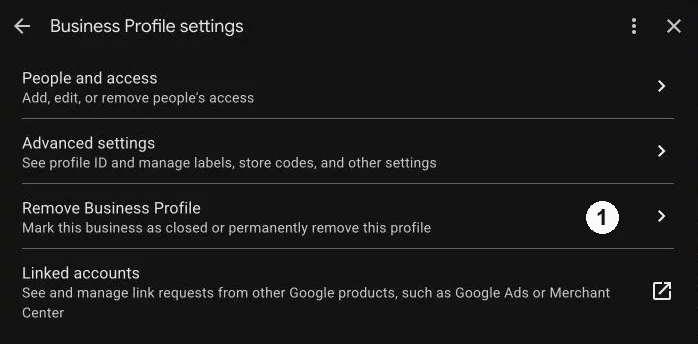
Select More Business Profile settings.[1]
Choose the removal
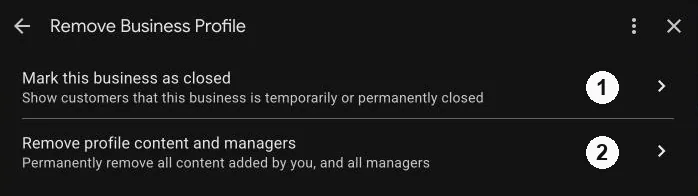
Select Remove Business Profile, then Remove profile content and managers.[1]
Mark it closed if it is
If customers should see it's closed, turn on Mark your business as permanently closed.[1]
Confirm
Select Continue, then Remove, then Done.[1]
- Removal is permanent and affects all owners and managers.[1]
- Posts, photos, videos and review replies from owners and managers are permanently removed.[1]
- Customer reviews are user-generated content, so they stay on the listing. Taking one down is a different process.[1]
- The business may still show up on Search and Maps unless Google considers it ineligible.[1]
- Managing the business on Google again means re-verifying the profile.[1]
Decide what you actually want first: this route ends management, while the request in the next section asks for the listing to come off.
How do I make my business not show up on Google?
If the goal is the listing itself coming off Google, this is the route. You don't need to own the profile to ask: Google can remove a business that never existed or isn't eligible to be on Google.[3]
Sign in
Sign into your Google Account, then open Google Maps.[3]
Select the business
On the map, select the business you want removed.[3]
Suggest an edit
Click Suggest an edit, then Place is closed or not here.[3]
Pick the reason and submit
Choose the option that fits, such as Doesn't exist here, then click Submit.[3]
Answer any follow-up
You might get a status email with questions. If the request is approved, the business will be removed from Search and Maps. Google decides.[3]
Of the four routes on this page, this is the only one that asks Google to take a listing down, and the decision stays with Google.
Worked example · made by Local Biz Legends
Worked example: four owners, four routes
Four owners, four different jobs. The route follows the situation, not a single delete.
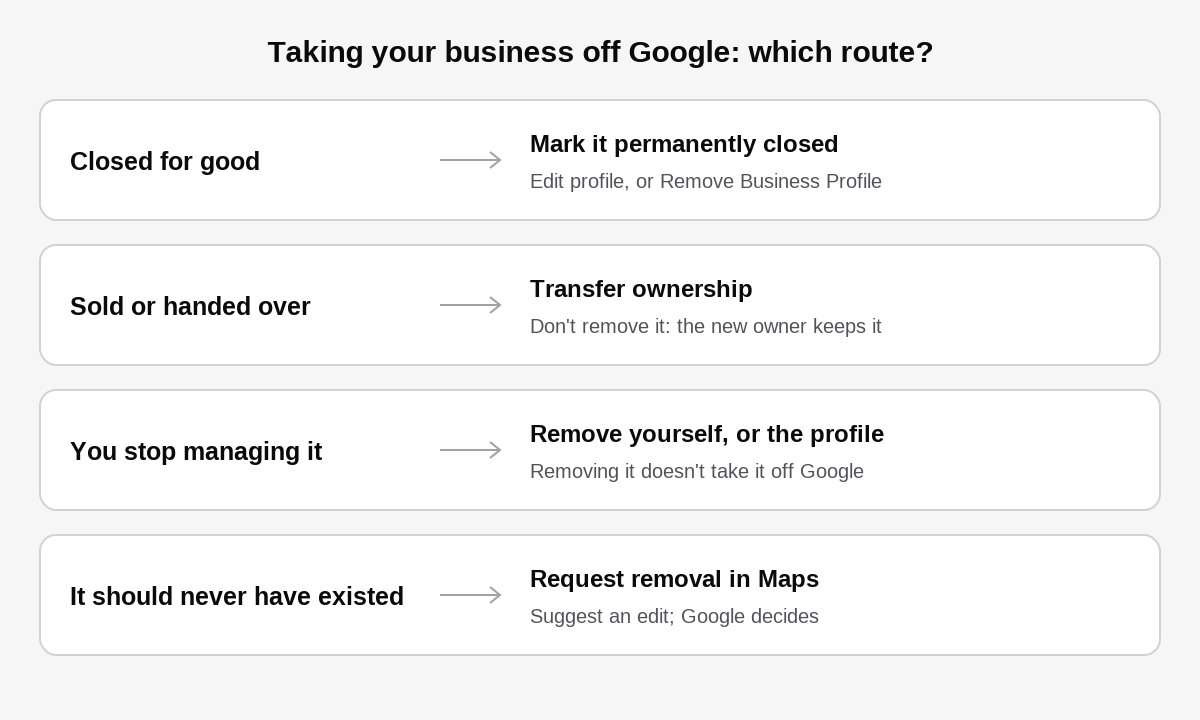
Four situations and the Google route each one takes
- A plumber retires
- The route: Mark the business permanently closed in the profile hours
- Who acts: Whoever runs the profile[2]
- The business is sold
- The route: Transfer primary ownership; a buyer can request ownership (a service-area business contacts Google instead)
- Who acts: The old owner, or the new one[1][4]
- A manager or second owner leaves
- The route: Remove yourself; the profile and its content stay
- Who acts: The person leaving[1]
- A listing for a business that never existed
- The route: Request removal through Suggest an edit; Google decides
- Who acts: Anyone signed in[3]
How do I unlink my Google Account from a business?
Unlinking works the other way round: you take yourself off the profile, and the profile stays. Google says you can remove your account from a Business Profile without removing other owners and managers, and it won't affect the current content.[1]
If you're an owner or manager and no longer want to manage the profile, remove yourself instead. Roles live on the People and access page in your profile settings, shown above.[1]
Primary owners have an extra step: transfer primary ownership first, so the profile keeps a manager, then remove yourself.[1]
Bought the business, and the profile is still owned by the seller or an old agency? Request ownership from the current profile owner; for a service-area business with no shop or office, Google asks you to contact it instead. Our listing your business on Google guide covers claiming and requesting ownership first.[4]
And if you'd rather someone else handled your Google profile, that's what we do.
Related help for owners
Rather have it done for you?
Get found everywhere people search. We do the work.
Questions owners ask
What happens to my reviews if I remove the profile from my account?
Customer reviews are user-generated content, so they remain on the listing. Your own posts, photos, videos and review replies go permanently. The business may still show up on Search and Maps unless Google considers it ineligible. A single review you want down is a separate process.[1]
Can I undo removing my Business Profile?
No. Removal of content and managers is permanent and affects every owner and manager. Google says that once the content is removed it can't be recovered or managed, and managing the business on Google again means re-verifying the profile. There is no undo.[1]
Does marking my business closed take it off Google Maps?
No. Google says a permanently closed profile may still appear on Search and Maps for people who search for the business, though it clearly shows the business is closed. Getting a listing off Search and Maps takes the separate removal request, and Google decides whether it's approved.[2][3]
Can I get a listing I never created removed from Google?
Yes. You can request removal of a Business Profile even if you don't own it, and a business can be removed if it never existed or isn't eligible to be on Google. Suggest an edit on the listing in Google Maps and submit. Google decides whether it comes off.[3]
How we checked this
Checked against Google's Business Profile help pages on removing a profile from your account, marking a business closed, requesting removal from Search and Maps, and requesting ownership, all read on 22 November 2026.
Read our methodSources
Numbered in the order this page cites them.- 1Nov 22, 2026
- 2Nov 22, 2026
- 3Nov 22, 2026
- 4Nov 22, 2026