Short answer
Google sometimes makes automated calls about your business listing: to confirm your hours, or to book for a customer. But Google never asks for payment, cards or passwords. If a caller wants money to keep your listing on Google, it is not Google. Hang up, do not press any buttons, and report the call.[1][2]
Google's own Business Profile help pages on automated calls and on fraudulent calls.

Does Google call businesses?
Yes, sometimes. Google might use automated calls or texts to reach the number on your Business Profile, to confirm your business details are up to date or to assist customers with inquiries.[1]
A real call tells you who it is from and why it is calling. Google gives this example: “Hi! I'm calling from Google Maps to update your business hours. This is an automated service, so this call is recorded to help improve Google services. Can you tell me your opening hours for the week?”[2]
Google also calls on behalf of customers. When customers use Google Search or Maps to connect with your business, Google might contact your business through an automated phone call to complete the request, and businesses and customers can use this feature at no charge. The requests include:[1]
- Booking an appointment for a customer.[1]
- Checking your restaurant wait time.[1]
- Confirming the price and availability of in-store products and services.[1]
If you confirm details on a call like this, the update lands on your profile marked as pending, and the review might take up to 5 business days. You can edit or remove these updates at any time by visiting your Business Profile.[1]
You do not need to wait for a call. If your hours or address changed, edit your Google business profile yourself.[3]
What a real Google call will never ask for
Google's list is short. Google will never ask for payment, credit card information, or account passwords. You won't be asked to sign up for a service, pay money, or give personal info.[1][2]
There is no paid spot either. Google says its operators will never ask for payment information over the phone, and will never guarantee you a special spot in its products. A caller selling a first-place listing or a verification fee is describing something Google says it never does.[2]
Real verification starts from your own profile. If phone or text is one of your verification options, you choose it in your profile, then answer the call or open the text and enter the code yourself. Google will never ask for your verification code. If you have not verified yet, see how Google Business Profile verification works.[4]
Worked example · made by Local Biz Legends
Worked example: three calls, real or scam?
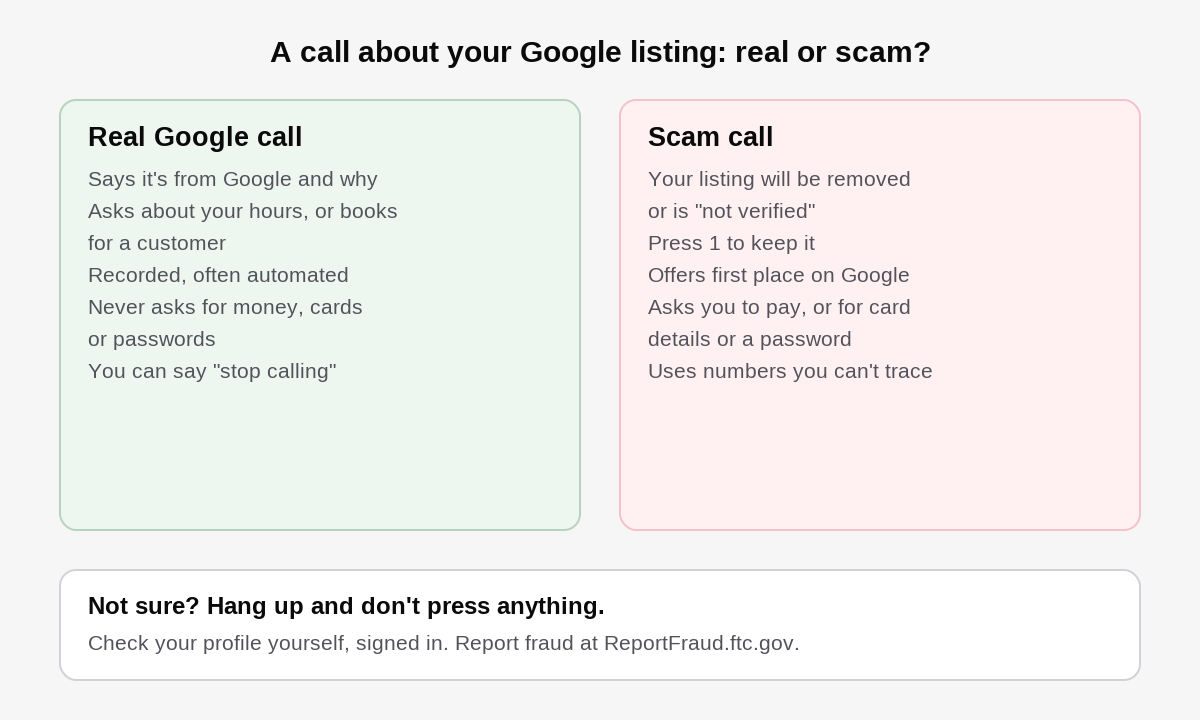
Each call below gets judged against Google's own description: a real call says it is from Google and why, asks about your details or a customer's request, and never asks for money, a sign-up, or a promised spot.[1][2]
Three calls judged against Google's own description of its calls
- An automated voice asking for this week's opening hours
- It wants: Your hours, nothing else
- Verdict: Real
- Why: It matches Google's example call: from Google Maps, about your hours.[2]
- A recorded voice: your listing will be removed today, press 1 to talk to an agent
- It wants: A button press, then an upsell
- Verdict: Scam
- Why: Google tells you to hang up on calls pretending to be from Google, and not to press any buttons.[2]
- A friendly caller from a 'Google partner team' offering to lock in first place
- It wants: Payment and a sign-up
- Verdict: Scam
- Why: Google never asks for payment over the phone, never guarantees a special spot, and never asks you to sign up for a service.[2]
The 'you are not showing on Google' line is easy to check. Search your business name on Google Maps and see for yourself. If something really is wrong, find out why your business is not showing on Google Maps.
How to stop the calls
When a suspicious call is on the line, hang up and press nothing, even if the recording tells you to. Pressing buttons might lead you to more suspicious calls.[2]
Register your number
In the US, put your phone number on the National Do Not Call Registry at donotcall.gov or 1-888-382-1222.[2]
Report fraud to the FTC
Report fraudulent calls and texts to the Federal Trade Commission (FTC) at ReportFraud.ftc.gov.[2]
Forward scam texts
Copy the message and forward it to 7726 (SPAM). This helps your wireless provider spot and block similar messages.[2]
Tell Google
Google tracks calls that pretend to be from Google. Tell it about the call on its webform, and include what the caller said and sent.[2]
Google's own automated calls are optional too. If you don't want your business to receive them, you can tell Google over the phone or change your Business Profile settings.[1]
The switches live in your profile: select More Business Profile settings, then Advanced settings, and under 'Google automated calls and text messages' turn the features on or off.[1]
- Bookings and inquiries from customers.[1]
- Keep your profile up to date.[1]
- Post to your profile on your behalf.[1]
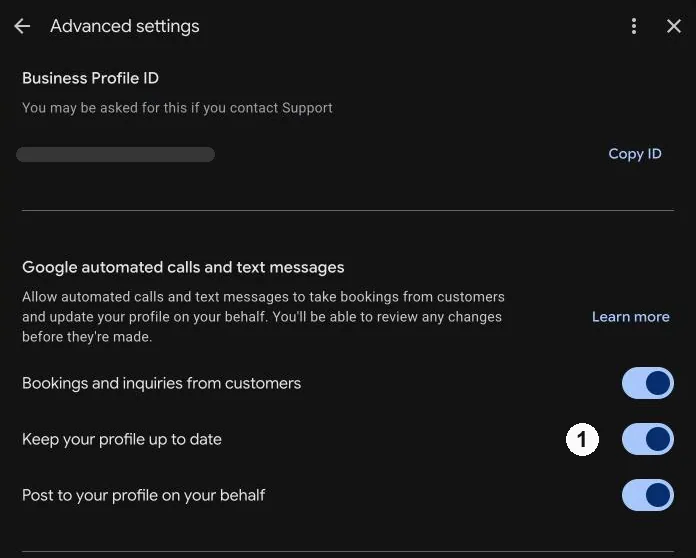
One catch: Google requires a verified Business Profile before you can opt out.[1]
Even after opting out, you may still occasionally get manual calls from Google to confirm your business information.[1]
Why do I keep getting spam calls about my business?
Part of the answer is that your number is public. Google's real calls only go to businesses with public phone numbers for the purpose of receiving calls from the general public. A Business Profile is exactly that kind of number.[2]
On the other end are people and companies making suspicious calls and texts to trick others. They might say they work “with Google” or “for Google,” and they sell schemes and online marketing services to unsuspecting individuals and companies.[2]
Google says these calls are bothersome, and that it is doing its part to try to stop them, but that this isn't always within its control. Many of these callers use untraceable phone numbers and other cloaking tactics, so blocking every one is hard.[2]
If you would rather someone else handled your Google profile, see how we help business owners get found.
Related help for owners
Rather have it done for you?
Get found everywhere people search. We do the work.
Questions owners ask
Does Google verify business by phone?
Only when you ask it to, from your own profile. Phone or text can be one of the verification options: you select it in your profile, then answer the call or open the text and enter the code. Google will never ask for your verification code, and never asks for payment, card details or passwords. A caller who asks for your verification code is not Google.[1][4]
Can Google call a business for you?
Yes, on behalf of a customer. When customers use Google Search or Maps to connect with your business, Google might call your business through an automated phone call to complete the request, at no charge. Google limits calls for the same info and avoids late night and early morning hours.[1]
Will Google remove my listing if I ignore an automated call?
No. Google describes these calls as a standard process to help customers find you, and says they do not affect your account standing. Anything you provide is added to your profile, and you can edit or remove it at any time. And if a caller asks for money to keep your business on Google, it is not a call from Google.[1]
How we checked this
We checked every claim about Google on this page against Google's own Business Profile help pages on automated calls, on fraudulent calls, and on editing your profile, as fetched on 21 November 2026.
Read our methodSources
Numbered in the order this page cites them.- 1Nov 21, 2026
- 2Nov 21, 2026
- 3Nov 21, 2026
- 4Nov 21, 2026